
Your member number and account number are not the same.
At Sierra Pacific Federal Credit Union, your member number and account number serve different purposes. Using the correct number helps ensure your transactions are processed successfully and without delay.
Why It Matters
Your member number is primarily used for Shared Branching transactions or when working directly with the credit union.
Your account number is used for electronic transactions, including:
- FedNow transactions
- ACH transfers
- Direct deposits
- Ordering checks
Sierra Pacific Federal Credit Union is now live and able to receive FedNow transactions. To successfully receive these transfers, you must provide your full account number, including the account suffix.
Using only your member number may cause the transaction to be rejected.
How Your Account Number Is Formed
Your account number is your member number followed by the account suffix.
For example:
Member Number: 000004321
Checking Account Suffix: 015
Full Checking Account Number: 000004321015
When to Use Each Number
Use Your Member Number For:
Shared Branching transactions or when contacting Sierra Pacific Federal Credit Union directly.
Use Your Full Account Number For:
FedNow, ACH transactions, direct deposits, electronic transfers, and check orders.
Ordering Checks?
If you order checks from a provider other than Sierra Pacific Federal Credit Union, make sure you use your full account number, including the suffix. Using an incorrect account number may cause delays or processing issues.
Where to Find Your Member Number
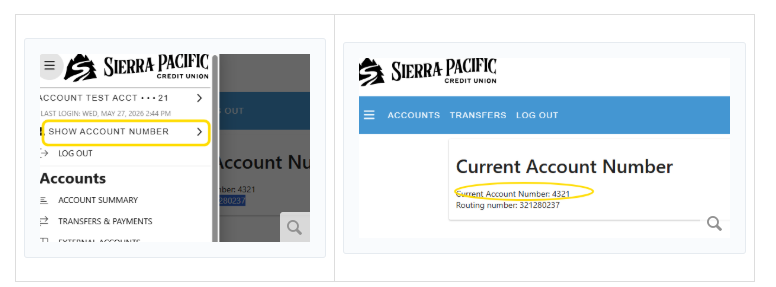
To find your member number for Shared Branching or when calling/visiting a branch:
-
Sign in to Online Banking or open the Mobile App.
-
Open the account number menu by clicking the hamburger menu underneath Show Account Number.
-
Your current account number, used as your member number for Shared Branching, will be displayed.
-
The routing number will appear underneath it.
Where to Find Your Account Number
To find your account number for FedNow, ACH transactions, direct deposits, and checks:
- Sign in to Online Banking.
- Select the account tile for the account you want to view.
- Under the account name, locate your balance and available balance.
- Click the Account Info tab.
- Your account number and routing number will be displayed.
Not Sure Which Number to Use?
*To participate in this offer, the Skip-A-Pay form must be returned to Sierra Pacific no later than three (3) business days prior to the scheduled monthly transaction date. Your ACH will not be stopped. Your funds will be available for withdrawal in your Sierra Pacific savings account. Available for November 2025 or December 2025 qualifying loans only. Loan must be open for at least three (3) months to qualify, and members must be in good standing. Interest will accrue during the entire term of the loan, including the non-payment period. HELOCs, credit cards, and overdraft lines of credit are not eligible. Not all members qualify. Members must apply between November 2025 and December 2025 to qualify. See credit union for details. Federally insured by NCUA.